Listings, area scans, budget notes, documents, expert warnings, family opinions, and open questions stay in one visual space.
Global Relocation Workbench
The AI desk for buying abroad.
ReloCanvas replaces the kitchen table, folders, clippings, spreadsheets, inbox, WhatsApp notes, screenshots, advisor comments, and memory with one living visual decision space.
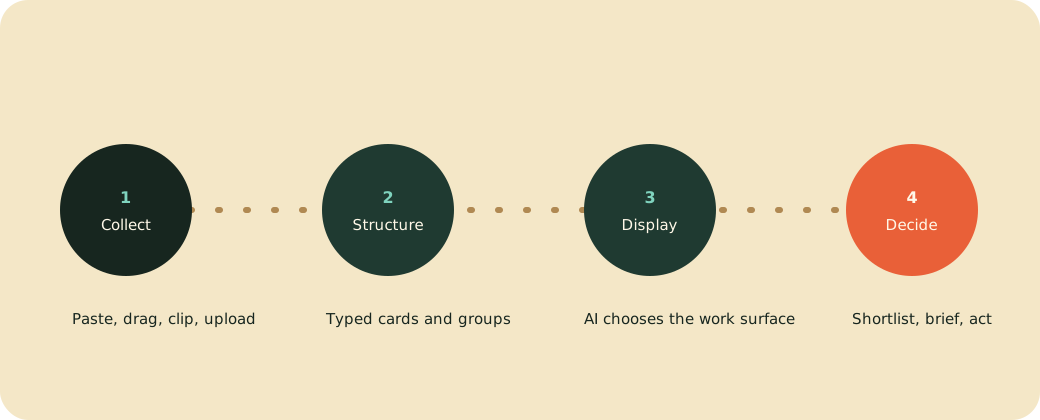
Messy inpaste, clip, upload, drag, note
Structured by AIcards, groups, maps, tables
Decisions outcompare, shortlist, brief, act
What it is
A personal decision workbench for buying abroad.
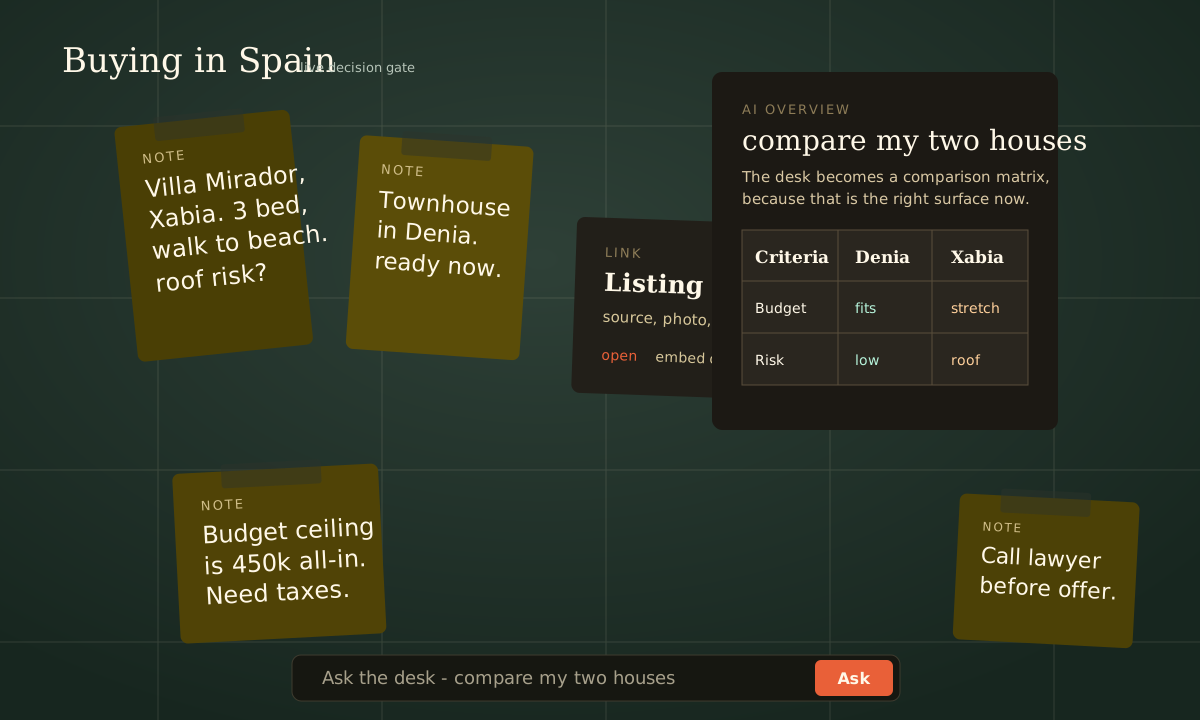
The consumer throws every relocation fragment onto the table. ReloCanvas turns it into movable, annotatable, comparable decision objects and lets AI generate the best surface for the current question.
x Not a property portal with saved favourites.
x Not a spreadsheet with too many columns.
x Not a fixed wizard or static dashboard.
The thesis
Digitize the pre-structured mess.
Real buying decisions happen before the clean report exists: people gather evidence, make piles, write notes, ask advisors, change priorities, and compare options repeatedly. That messy sensemaking is the product.
The system assumes the consumer manages many possible homes until one becomes the right decision.
200 m2 can mean "large house", "too much upkeep", or "family fit". The user defines the decision language.
The same objects can become a map, comparison matrix, risk board, dossier, checklist, or report depending on the current task.
The visual driver
A kitchen table, felt board, notebook, map table, and AI analyst in one surface.
The GUI is not decoration. It is the product direction: low-friction capture, spatial arrangement, annotation, grouping, and AI-generated overviews on top of the user's own material.
Low friction inPaste text, URLs, screenshots, PDFs, maps, and raw notes directly onto the desk.
Spatial meaningCards have a place. Piles, stacks, lanes, and proximity become part of the reasoning.
Converging outputThe desk exists to produce comparisons, conclusions, advisor briefs, and final next actions.
The AI innovation
AI is the presentation planner, not just a chat box.
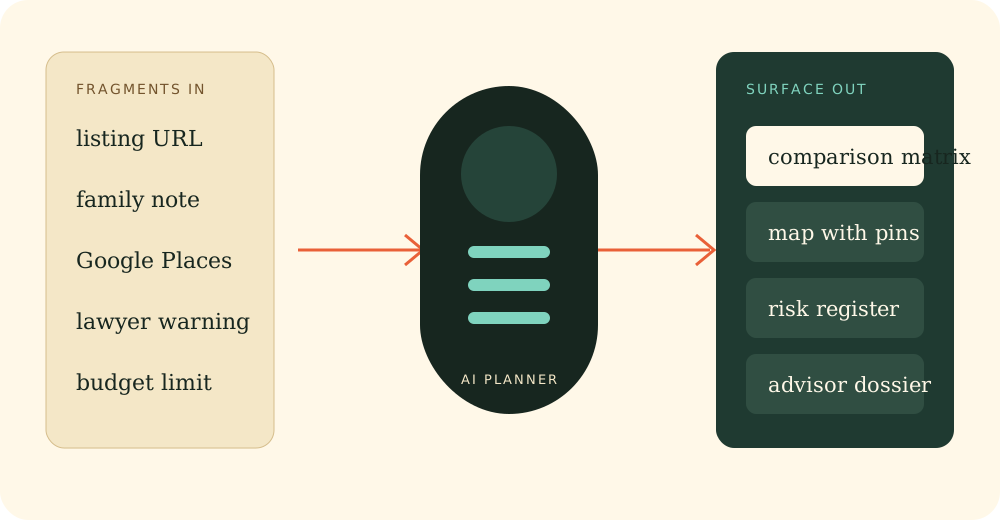
The user asks a decision question. The AI looks at the current desk, selects the right predefined components, fills them with the right objects, and explains what to inspect next.
Safety and scalability
Stable objects
Property, note, place, budget, risk, document, contact, and decision objects keep their identity while the display changes.
Constrained generation
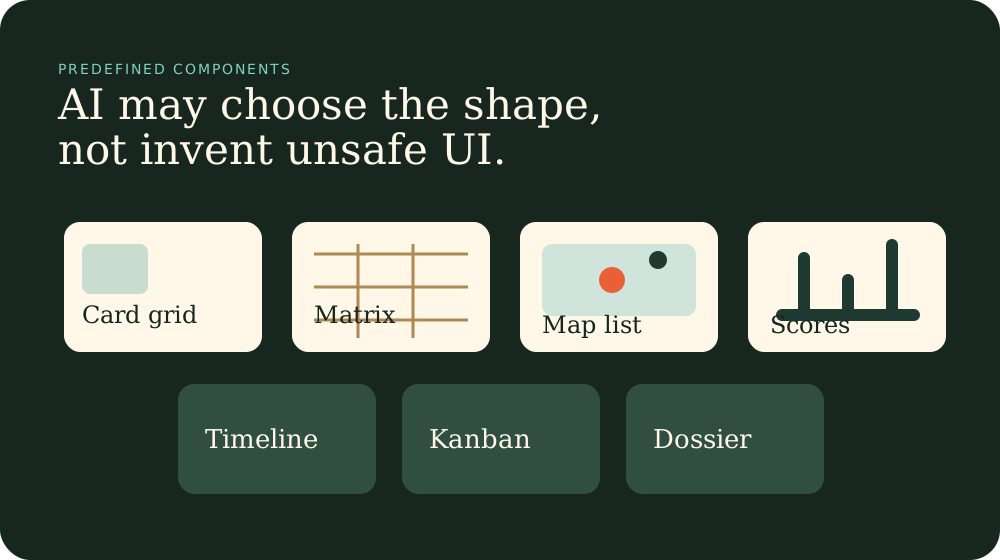
The AI chooses from a component library. It configures views; it does not invent unrestricted runtime UI.
Human control
The user can move, rename, pin, reject, annotate, and reorganize what the AI proposes.
Workbench modes
Not fixed pages. Temporary work surfaces around the current task.
A mode is a useful arrangement of components for a decision moment. The same underlying material can appear in multiple modes.
Collect
Throw information onto the table without first designing the perfect database.
- Paste listings and notes
- Clip pages and screenshots
- Upload documents
Understand
Turn messy fragments into typed, explainable cards with sources and confidence.
- Detected facts
- Missing data
- Personal tags
Compare
Switch from emotional browsing to rational comparison when the decision demands it.
- Criteria matrix
- Weighted scores
- Risk rows
Explore location
Ask whether a place works for family, healthcare, transport, lifestyle, and budget.
- Map layers
- Nearby amenities
- Area confidence
Decide
Move from evidence toward a shortlist, go/no-go status, and unresolved questions.
- Options board
- Decision matrix
- Next actions
Prepare handoff
Turn the desk into something useful for humans outside the canvas.
- Mortgage brief
- Legal dossier
- Family report
Team one-pager
The concise explanation.
Use this framing to align development goals: build the workbench experience first, then feed it with data sources, partner workflows, and monetisation paths.
Promise
Buying abroad is too complex to track in your head, inbox, spreadsheet, and WhatsApp. ReloCanvas gives one visual AI-assisted place to collect, compare, organize, update, and decide.
User pain
The consumer loses overview across many houses, changing facts, documents, advisors, family comments, and risks. They forget why an option mattered.
Product answer
Everything becomes a movable decision object on a desk: properties, places, notes, documents, risks, advisors, questions, and conclusions.
Differentiator
AI does not just answer with prose. It chooses the best display: matrix, map, cards, timeline, risk register, kanban, dossier, or report.
MVP proof
Paste fragments, create typed cards, ask a question, and watch the model choose a table or comparison layout from the available cards.
Phase 2 proof
Make the workspace feel like a real desk: paste, drag, group, stack, annotate, zoom, and generate overviews directly on the canvas.
Future feeders
Property portals, Google Places, documents, emails, CRM notes, mortgage partners, lawyers, project managers, and family comments all feed the same desk.
Build rule
If a feature does not help the user collect fragments, structure them, manipulate them visually, or converge toward a decision, it is secondary.
Development goal
The pulling driver is the GUI experience.
Define the AI-first future-ready workbench, then treat content sources as feeders. The innovation is manipulation of live data elements plus AI-generated displays from a constrained component library.
Build the ultimate decision preparation toolset.
ReloCanvas should feel like a kitchen table with pen, paper, scissors, maps, folders, sticky notes, advisor input, and an AI analyst that can instantly reshape the table for the user's current question.
Logo and visual identity
Warm decision room, not generic SaaS.
The redesigned mark combines a home, map pin, stacked decision layers, warm paper, and dark felt. It is intentionally less sterile than the first concept because the product is about human sensemaking.

#17261FFelt
#1F3A31Desk green
#E96038Action coral
#B08952Wood
#FFF8E8Paper